Late checkout
Checkout is 11:00 AM. Two tiers. Offer it at check-in, not on checkout morning.
$50 and $77 are what the guest pays. No tax is added. Never type a different price into Cloudbeds and never discount it. There is no earlier, cheaper tier any more — if you see an item that starts with RETIRED, don't use it.
Before you sell it, check the room
1. Is another guest arriving into that same room that day?
2. Is another room of the same room type free that night?
If the hotel is sold out, the 7 PM checkout needs the GM's OK before you promise it.
As soon as you sell one, tell housekeeping. A 1 PM room is cleaned later the same day. A 7 PM room is a hold-over and gets cleaned the next day.
What to say
“Checkout is at 11. If you'd like a slow morning, I can keep the room for you until 1 for $50 — or all the way to 7 tonight for $77, so you can get out and shower before the drive home.”
Early check-in
Check-in is 4:00 PM. Earlier than that is $50.
| Early Check In Fee | $50 | SKU 033 |
Only sell it once housekeeping confirms the room is clean and ready. Don't promise a time you can't keep.
“Your room's ready now if you'd like to get in early — it's $50. Want me to add it?”
One more night
Offer every guest another night at half what they're paying — with a $100 minimum.
- Price: half their nightly rate, rounded up to the dollar, never below $100.
- Never a Saturday night. Don't offer it.
- Only if their room is free that night (or you can move them to a free room of the same type).
Type their rate to see the offer.
Examples:
- $120 a night → offer $100
- $199 a night → offer $100
- $201 a night → offer $101
- $253 a night → offer $127
“Before you go — your room is free tomorrow night. If you'd like to stay one more night, I can do it for half what you're paying, [price]. Want me to add it?”
Extend the reservation by one night and set that night's rate to the offer price. Then type ONE MORE NIGHT in the reservation notes.
Never ring it up as a product or a custom charge. That charges the wrong tax and leaves the room open for an online booking on top of your guest.
Suggest what fits
Ask first, listen, then suggest one or two things that fit what they told you. Say the price once, then let it go — a “no” is fine.
| They mention… | Suggest (Cloudbeds item & price) |
|---|---|
| Long drive home | Late Checkout (1 PM) · $50 Later Checkout (7 PM) · $77 Ask when they head home. |
| Got here early | Early Check In Fee · $50 Only once the room is ready. |
| Celebrating | Romance Package · $50 Romance Package (With Alcohol) · $70 Rose petals, chocolates and candles set up in the room. |
| Getting outside | E-Bike Rental · $75 Full-day e-bike. |
| Needs a reset | Cold Plunge (guests + locals) · $20 Wellness Package (1 day pass) · $75 The desk fills and drains the plunge — book a time. |
| Wood-fireplace chalet | Fire Log · $7 Duralog · $8 The Duralog lights instantly. |
| Cooking in | Vaquero Seasoning · $15 Vaquero Chili Oil · $20 |
| Slow, cozy weekend | Scent Diffuser · $40 Sessions Candle · $25 |
| Kids along | Coloring Book · $16 puzzle · $32 cards · $14 |
| Bringing the dog | Pet Fee · $50 Required for every pet, per stay — not a sale. Lodge rooms are pet-free. Use the dog's name. |
| Take a little Sessions home | Sessions Hoodie · $45 Sess T-shirt · $25 Camp mug · $18 Sessions Candle · $25 At checkout. |
Don't sell an item that isn't in Cloudbeds, and don't make up a price. Sessions has no food, drink or beer items in Cloudbeds, and no s'mores kit or firewood bundle item. Ask your manager before selling any of them.
At checkout
“How was your stay? Next time, book direct on our website or by phone — it's 10% off.”
How to charge it in Cloudbeds
The same five steps for everything on this page.
If the folio shows a green ADD/ADJUST CHARGE button instead of a blue + Add, click Switch to the new folio in the blue banner first.
Open the reservation, click Folio
Click + Add, then Product
Not Room Revenue, not Adjustment. Product pulls from our item list.
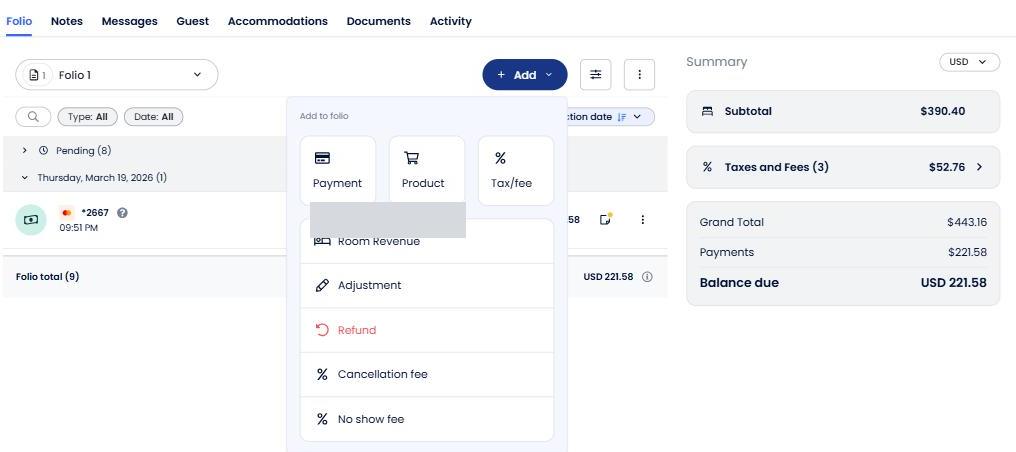
Blue + Add, then the Product tile. Pick the product category
Use Fee for late checkout, early check-in, pet fee and cold plunge. Use Additionals for the Romance Package, e-bike and wellness pass. Shop items have no category — just search the name.
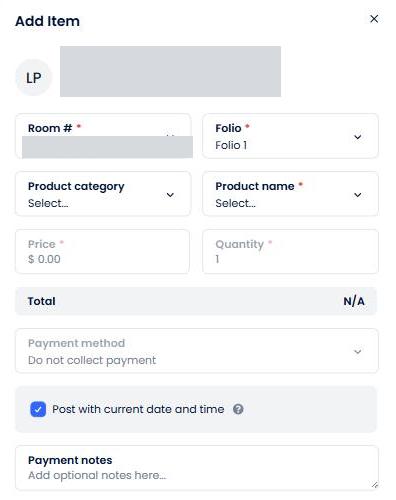
The Add Item panel. Choose the product — the price fills itself
Start typing the name (for example
checkout). Never type or change the price. If the price doesn't fill in, you picked the wrong item. More than one? Change Quantity.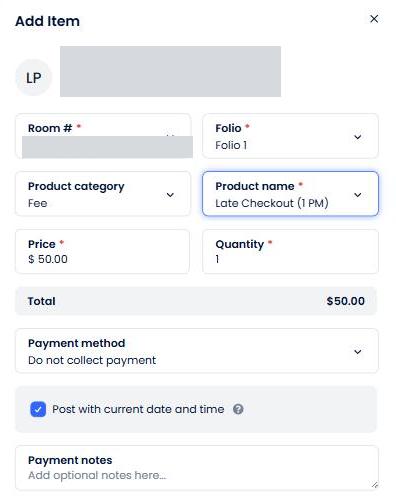
Filled in right: the price appeared on its own. Payment method, then Add
Taking a card now? Choose the card. Putting it on the room? Leave Do not collect payment.
Every charge is credited to whoever is logged in. A custom charge, or ringing something through the wrong item, means the sale doesn't count as yours and our numbers go wrong.
Price list
Everything active in Cloudbeds. Search mid-shift. Cloudbeds adds any tax set on the item.
| SKU | Item | Category | Price |
|---|
Check yourself
Answer before you open each one.
A guest checks in Friday. Someone arrives into that exact room Saturday. Can you sell the 7 PM checkout?
Only if another room of the same room type is free Saturday night, so the arriving guest can be moved. Otherwise no.
A guest asks for late checkout "just until noon, for less". What do you say?
There is no noon tier. The options are 1 PM for $50 or 7 PM for $77. Never type a lower price into Cloudbeds.
How much tax goes on the 7 PM checkout?
None. $77 is the full price.
A guest wants One More Night for a Saturday. What is the price?
You don't offer it. One More Night is never a Saturday night.
How do you enter One More Night?
Extend the reservation by one night, set that night's rate, and type ONE MORE NIGHT in the notes. Never as a product.
A guest wants a beer bucket. What do you ring up?
There is no beer item in Cloudbeds at Sessions. Ask your manager — never invent a custom charge.
The price field is blank after you picked a product. What went wrong?
You picked the wrong item or didn't select it from the list. Pick again. Never type a price in.